Egnyte is Artisan’s file-sharing system. We ask that you upload your files to Egnyte on a daily basis, to ensure we maintain the latest versions of all files. We do this so others can access them for review and editing, or in case of an emergency.
Egnyte File Structure
Each client is set up individually in Celoxis. Upon selecting any client from the list, you’ll find both client-level folders and project-level folders.
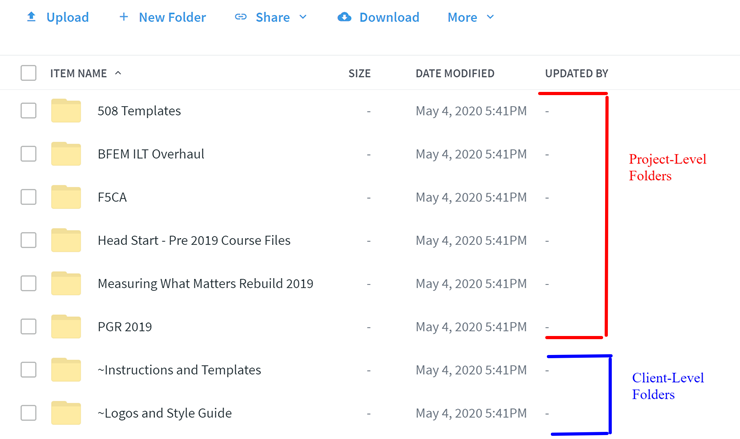
Client-Level Folders
Every client we work with has a folder containing the following:

Project-Level Folders
Each project has a dedicated folder. You’ll have access to the following areas as necessary:
Client Files
The Client-Provided Content folder contains files and documents provided by the client. When an item is referenced in the storyboard isn’t in the Working Files/Resources-Attachments folder, check this folder.
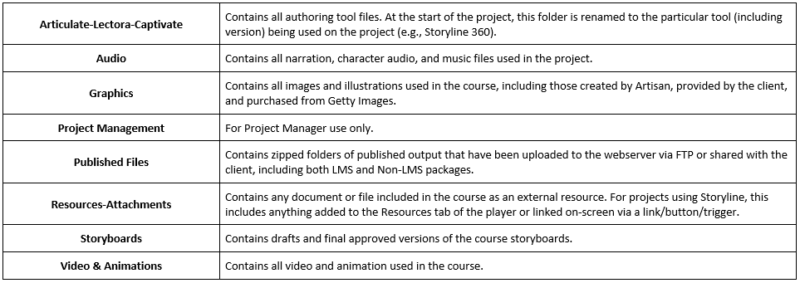
Working Files
The Working Files folder is where you will spend the most time. It contains subfolders for everything that goes into developing the course.