
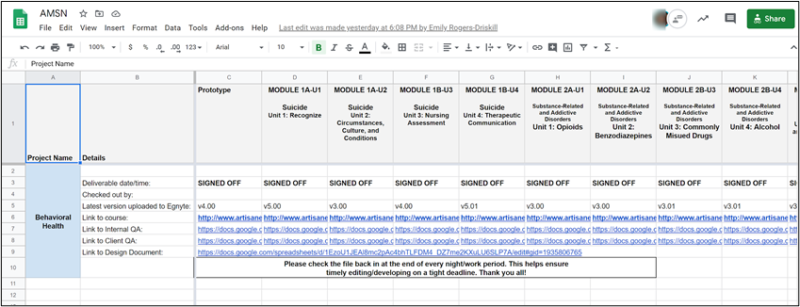
The checkout master is a spreadsheet that Artisan uses for tracking:
- Deliverable date and time.
- Who is currently working in an authoring tool file.
- The most recent version of the authoring tool file on Egnyte.
- The current hyperlink to view the published course.
- Links to both the Internal and QA Spreadsheets
- A link to the Design Document.
Checkout Master Tips:
- Any time you’re actively working, check out the authoring tool file by entering your initials in the Checked Out By field.
- When you have finished a work session or are done for the day, verify that your files have been successfully uploaded to Egnyte and/or the Web Server (via FTP), and remove your initials from the Checked Out By field to check the file back in.
- The current URL goes in the Link to Course field for each section/module of the course. Refer to the Creating the URL Hyperlink to Course job aid for guidelines on how to create and update this URL.
- It’s important to populate the correct URL in the checkout master whenever uploading to Artisan’s web-server (via FTP). The correct checkout master URL always ends in story.html—regardless of what version of Storyline has been used.